This last week someone sent me a CD with fifty 60 second tracks (it was a presentation that someone inexplicably saved as fifty separate tracks instead of one contiguous fifty minute block) that they wanted ripped into a single MP3. Ripping is easy with CDex and my initial google search left with with Audacity, which looked promising but I couldn’t figure out how to merge multiple MP3 files into a single file (using Audacity that is). Finally, I came across this little gem on binarybonsai.com, where a commenter mentioned that you can use the DOS copy command to append one files (or multiple files) to one another, creating one big file from many. Syntax is as follows:
> copy /b file1.mp3 file2.mp3 file3.mp3 end_result.mp3
which combines file1.mp3, file2.mp3 and file3.mp3 into end_result.mp3. The /b switch indicates that you’re copying binary files.
All posts by ajohnson
Top 15 Ant Best Practices
Good stuff over at OnJava.com, the article “Top 15 Ant Best Practices” gives 15 recommendations on how you should be using Ant to structure and complete your builds. We’re using most of these already at work; I’d be curious to know the author’s take on the deployment system we’ve developed using Ant. I’ve got Subversion handling source control, so on the production machines, I have a build file called build-production.xml that I invoke from the command line using a batch file:
ant -buildfile build-production.xml
which a) checks out the latest build from Subversion / source control, b) executes the default build file (which is in source control) which compiles the project and then wraps up the result in a war file, c) stops the Tomcat Windows service, d) deletes the existing application from the $tomcat/webapps directory, e) unpacks the application from the .war creates in step b, and then finally f) starts the Tomcat Windows service.
It’s worked out pretty well so far in that it decouples the build file for the project from having to know anything about the environment in which it’s executing so developers can write their own build-development.xml which maybe does something similar to the build-production.xml, but deploys to a different location, or even a different application server.
The wrapper build file (be it build-production.xml, build-local.xml, etc..) can also override properties set in the project build.xml. In our projects, I’ve got the build.xml file conditionally setting properties in log4j.properties using the <propertyfile> tag. There are two such targets: one for production that sets the appender to SMTPAPPENDER and the logging level to ERROR and one for development that sets the appender to STDOUT and the logging level to INFO. Said targets use the if and unless attributes of the <target> tag like so:
<target name="build.resources.debug" if="project.debug">

...
and
<target name="build.resources.production" unless="project.debug">

...
This way, unless I set the project.debug property, the system will always be in ERROR / SMTPAPPENDER mode but developers can override that property at compile time using the wrapper build-local.xml to set the project.debug property, ie:
<ant antfile="build.xml">

  <property name="project.debug" value="true"/>

</ant>
Do you do it better? Can you one up me? I’ve love to hear about it.
ASP, Java, Cookies and URLEncode
One of the bugs I tracked down a couple months ago dealt with the different ways in which ASP and Java handle URL encoding in a cookies. ASP automatically encodes and decodes cookie values (without you telling it too even though it the Server object has a method ‘URLEncode’ which does the same job) while Java requires that you explicity use the URLDecoder and URLEncoder, otherwise it sends the cookie values without encoding them first, which in my case lead to an interoperability problem (one assumes URL encoding of cookie values, one doesn’t).
But then it gets weirder. The encoding that ASP automatically applies is different than the encoding that Java applies. For example, in ASP you’d write something like this to set a cookie with my email address:
Response.cookies("encoded") = "ajohnson@cephas.net"
which would then result in this:
ajohnson%40cephas%2Enet
where in Java you’d have something like this:
String email = "ajohnson@cephas.net";

String encoded = URLEncoder.encode(email, "UTF-8");

res.addCookie(new Cookie("encoded", encoded););
which results in this:
ajohnson%40cephas.net
So why does ASP encode the period as %2E and Java leave it alone? The Microsoft documentation for the ASP Server object contains very little documentation about the URLEncode method other than to say that the URLEncode method
… applies URL encoding rules, including escape characters, to a specified string.
(which could be a teensy bit more helpful, must have been a programmer writing that documentation). On the other hand, the Java URLEncoder class documenation says that the special characters “.”, “-“, “*”, and “_” are not to be encoded according to the HTML specification, which itself cites RFC 1738 which says:
…the special characters “$-_.+!*'(),”, and reserved characters used for their reserved purposes may be used unencoded within a URL.
which seems to me to imply that the ASP Cookie object is wrong (ie: it should leave the period alone in the email address). And beyond that, it’s pretty aggressive in assuming that I want to encode the data in my cookies. Am I missing something? How do other languages (PHP, Python, Perl, etc..) implement the same functionality? Aren’t web applications fun?
Douglas Hofstadter @ MIT on April 12
Douglas Hofstadter (Le Ton beau de Marot, Goedel, Escher, Bach, The Mind’s I, etc..) will be speaking at MIT on April 12. More information is available at on the MIT Language, Cognition, and Computation Seminar Series website. I wish I could go to this one.
Tomcat 5.0.x and ClientAbortException
I’ve got an application deployed on Tomcat 5.0.28 that, when in production, uses log4j with the SMTP appender to send relevant debug / error messages via email. Soon after deploying the application I began receiving messages from the application which contained this stack trace:
java.io.IOException: ClientAbortException: java.net.SocketException: Connection reset by peer: socket write error at org.apache.coyote.tomcat5.OutputBuffer.doFlush(OutputBuffer.java:331) at org.apache.coyote.tomcat5.OutputBuffer.flush(OutputBuffer.java:297) at org.apache.coyote.tomcat5.CoyoteOutputStream.flush(CoyoteOutputStream.java:85) at sun.nio.cs.StreamEncoder$CharsetSE.implFlush(Unknown Source) at sun.nio.cs.StreamEncoder.flush(Unknown Source) at java.io.OutputStreamWriter.flush(Unknown Source) at java.io.BufferedWriter.flush(Unknown Source)....
The stack trace isn’t anything special: you’ll get a ClientAbortException whenever the HTTP client on the other end closes the connection prematurely (ie: before Tomcat has a chance to complete the flush of information to the output stream). The problem is that it pollutes your log file, or in my case, my inbox because I was receiving an email every time one of these errors occurred. My log4j configuration file looked something like this:
log4j.rootCategory=ERROR, SMTPAPPENDER

log4j.appender.SMTPAPPENDER.To=me@mydomain.com

log4j.appender.SMTPAPPENDER.layout=org.apache.log4j.PatternLayout

log4j.appender.SMTPAPPENDER=org.apache.log4j.net.SMTPAppender

log4j.appender.SMTPAPPENDER.Subject=[my app] ERROR

log4j.appender.SMTPAPPENDER.BufferSize=512

log4j.appender.SMTPAPPENDER.From=errors@mydomain.com

log4j.appender.SMTPAPPENDER.layout.ConversionPattern=%-4r [%t] %-5p %c %x - %m%n

log4j.appender.SMTPAPPENDER.SMTPHost=localhost
which, in log4j parlance, means that I want any messages that are of type ERROR or FATAL sent to me via email. Instead I should have started it off with this:
log4j.rootCategory=FATAL, SMTPAPPENDER

log4j.category.com.mycompany=ERROR, SMTPAPPENDER

...
which translated means that I want any FATAL errors in any package sent to me via the SMTPAPPENDER but any messages of type ERROR or FATAL in the package com.mycompany sent to me as well. This effectively cuts out the unnecessary sending of ClientAbortException messages, while still generating the messages that I want to receive.
(Note: if your problem isn’t with log4j, but instead with your Tomcat log files, check out the debug settings in Server, Service, Engine and Host elements of your Tomcat conf\server.xml.)
Older MySQL JDBC Driver issues with INSERT, UPDATE, DELETE
I haven’t worked on my wife’s recipe site in ages. Originally written as an experiment with JSP and Java, I think my mom and Karen are the only people that use it (which is fine with me). In any case, I recently moved it to a new host and saw a weird issue pop up in catalina.out where any INSERT, UPDATE or DELETE statements were erroring out with the message:
java.sql.SQLException: Can not issue data manipulation statements with executeQuery()
Turns out that earlier versions of the MySQL JDBC driver allowed you to run INSERT / UPDATE / DELETE statements using the executeQuery() method of the PreparedStatement class, which violated the JDBC specification, but worked nonetheless. The newer versions are JDBC compliant and don’t allow that behavior, which causes the above mentioned SQL exception. More from the MySQL forums.
Modifying Memory Allocation on Tomcat 5.x on Windows
A search for ‘tomcat 5 outofmemory windows‘ returns about 2000 hits, not one of them shows you how can increase the amount of memory allocated to Tomcat via the Apache Tomcat Properties applet when running on Windows (some point to this Tomcat configuration document which seems to be a bit out of date). Start –> Programs –> Apache Tomcat 5.0 –> Configure Tomcat –> Java. The “Initial memory pool” corresponds to the JVM -Xms option (~ initial Java heap size), the “Maximum memory pool” corresponds to the JVM -Xmx option (~ maximum Java heap size) and the “Thread stack size” corresponds to the JVM -Xss option. The picture book follows:
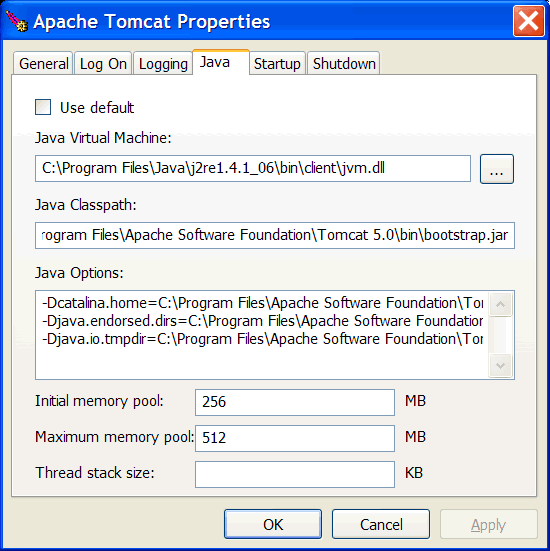
You can read more about the non-standard options on java.sun.com.
Configuring Apache James to send email via a smart host
Unfortunately we’re still using Windows on our servers at work, the last application I deployed didn’t have IIS installed on it (yay!), which means no local SMTP service. I needed a local SMTP server so I installed Apache James (I know, it’s probably overkill, but we might use some of it’s other features later). Anyway, buried deep in the SMTP Virtual Server properties applet in IIS is the ability to configure the server to send all email through another server; in IIS parlance this is called a ‘smart host‘. James (love the name btw) doesn’t have a ‘smart host’ option property sheet, but you can get the same functionality by using the <gateway> and <gatewayPort> elements of config.xml (buried in $james_install/apps/james/SAR-INF/config.xml). Read up on the options under RemoteDelivery.
Doug Cutting interview on TSS
The guys at TSS did a pretty indepth interview with Doug Cutting (who wrote Lucene and is now involved in the Nutch project). You can read the transcript here; there’s video there somewhere, I just couldn’t find it.
Donald Knuth on NPR
Donuld Knuth was on the Morning Edition this morning, you can still catch it via Windows Media Player or Real Player. He’s a real character (he leaves his bike helmet on inside because… eventually he’ll have to put it back on anyway).