Spent some time today buried in IIS trying to figure out why an ASP.NET application would throw the following error message for every single page that existed in an application within a website:
Server Error in ‘/myapp’ Application.
—————————————————-
The resource cannot be found.
Description: HTTP 404. The resource you are looking for (or one of its dependencies) could have been removed, had its name changed, or is temporarily unavailable. Please review the following URL and make sure that it is spelled correctly.
Requested Url: /myapp/default.aspx
—————————————————-
Version Information: Microsoft .NET Framework Version:1.1.4322.2032; ASP.NET Version:1.1.4322.2032
Googled for “resource cannot be found” and found this link on the third result page. In it Jarrett mentions that he solved the problem by reading this experts-exchange.com question which suggests setting up the application as a Virtual Directory in IIS instead of simply marking the folder in the website as an application, which of course solved the problem for me as well. Since a picture is worth a thousand words, here’s the difference between a Virtual Directory (which is an application in and of itself) and directory in IIS that has been marked as an application:
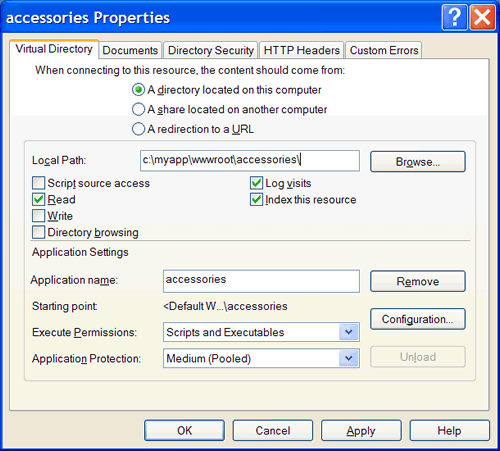
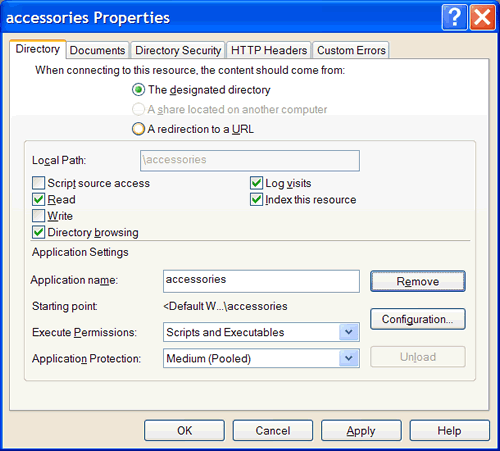
My suspicion is that the problem has to do with ASP.NET configuration inheritance settings with Virtual Directories not inheriting from parent directories like a folder marked as an application would, but there isn’t much to go on. Any Microsoft IIS experts out there want to talk about the difference between a Virtual Directory and a folder that has been marked as an application from a configuration standpoint?
That is totally random, but it worked, thanks.
Yeah, this works… thanks for the tip!
Try this, it solved the issue for me:
You may receive error messages when you browse or try to debug an ASP.NET application after you install security update 887219 (MS05-004)
http://support.microsoft.com/kb/894670/en
I have had this happen a few times now, this fix didn’t work for my case. Each time I have ended up reinstalling IIS, to solve the problem. Grrrrrr. My guess is the metabase is screwy.
Thanks! This post save a lot of headaches for me.
If you are still having problems after trying the MSKB article this may help. My problem did include the trailing backslash but it wasnt at the virtual dir or folder level. If you have a problem with a virtual dir go in to the properties and if you have an ASP.NET tab click on it, look at the “file location” it should look something like this: c:\inetpub\wwwroot\somedir\web.config, if it has 2 slashes after the wwwroot like this: c:\inetpub\wwwroot\\somedir\web.config thats your problem. Go to the properties of the website that is the parent of your virtual directory and go to the home tab, take out the trailing slash there and all your virtual dir problems should be fixed.
-onepoket
Hey, this is a great tip. I had tried just about everything until I found your page. My problem was fixed by removing the final trailing slash from the home directory of my root web site, “C:\InetPub\wwwroot\”.
-Conrad
Great tip. I had the problem with home directory having a final trailing slash. Thanks for the tip, onepocket
I am having the same problem in vs2005 in asp.net 2 environment. I am not using IIS. Any idea?
WIN XP PRO – SQL 2K – VS 2003 .. Worked like a charm. Thanks.. Strange..
Bummer, none of these suggestions worked for me. The bad thing is I know that I have had this problem before, but I can’t remember what I did to fix it. I probubly wrote it down but what are the odds that I will be able to find where I put it until I have already solved the problem.
This worked for me.
Also removing the trailing slash from the “Default Web Site” home directory fixed the problem so I don’t have to use the virtual directory fix.
Hi, removing the last slash from
C:\InetPub\wwwroot\
(Internet Services Manager -> “Default Web Site” Properties -> Tab “Home Directory”) fixed the issue. Thanks a lot!
I had the same problem but none of the above solutions worked. I fixed the problem as followed:
My home directory of my webserver was “W:\” (the root of a partition on my hdd called webserver). When i created a dir: W:\webserver and assigned that directory as root to the webserver, it suddenly worked!
I seems that asp.net 2.0 can’t handle database file path’s to a partition of hdd, but only a direct directory, or something like that 😉 Anyway, if you have the config as i had before, try this!
Worked for me as well.
I had the same problem as Chiel. I can confirm that by using instead of your root partition, in my case, E: drive, you should put in a folder so it would be E:\webserver\. By doing this I was able to create my virtual directory and web application at the same time and it was accesible afterwards through my browser. I just backed up my current web site and restored it to E:\webserver\ then configured my Home directory to point to that location, afterwards I created my virtual directory and web application by right clicking the Default Web Site -> New -> Virtual Directory and following the steps in the wizard.
This is the error that I had.
Description: HTTP 404. The resource you are looking for (or one of its dependencies) could have been removed, had its name changed, or is temporarily unavailable. Please review the following URL and make sure that it is spelled correctly.
Hope this helps others.
Can someone help? None of the above worked for me.
I did a web setup deployment in .net 2005, and ran the MSI on the client’s machine.
Everything seemed fine, except that he gets the 404 over and over again, no matter what I do.
I’ve tried: removing all trailing backslashes, uninstalling .net platforms 1.0 and 1.1, -ga (grant access) option to metabase for aspnet, client, and anonymous IUSR, setting it up as a virtual directory (MSI deploys it already as such), I even gave everyone full control over the folders… nothing.
.NET 2005 does deploy via assemblies in the bin, with the aspx pages having that COMPILED extension, pdbs and dlls, etc. Does this have anything to do with it?
Help, please and thanks,
JJ
I had the same problem, and it took hours to discover that VS 2005 had added the element to the web.config. According to MSDN, “If False, the application is effectively turned off.” Brilliant.
Sorry, that should read “VS 2005 had added the element <httpRuntime enable=’False’/>”
Here is the description:
http://msdn2.microsoft.com/en-us/library/e1f13641.aspx
great Andrew
this post is the REAL troubleshooter. i have tried everything until i removed the trailing slash from the root directory where the .net project is hosted. and it worked like there is no tomorrow. i tip works 100%. microsoft should put a link to this page instead of giving scrappy work-arounds. gtg now, i have other exceptions to debug. thanx once again 🙂
Hey aJohnson. I’ve tried your solution to solve a similar problem of mine but it didn’t work.:/ Yet I got another workaround. I’ve followed your approach (took the last slash from the Local Path string). Then in the WebSite folder, where you have your WebApplication, I went to properties->Web Site and set the IP Address to the computer IP. I Also checked if the ASP.NET tab was in the correct version of ASP.NET for the application. And that was it.
Hope this helps.
Modify the web.config.
add before the node. maybe can resolve this problem.
httpRuntime enable=true
Hi Aaron thanks for that – saved me tearing my hair out – the removing trailing slash worked for me.
Although this page dates back to summer 2005, people are still posting to it, so I suppose this issue is still bugging developers. I came across this page because I also got that completly useless error message.
I found another cause for the problem.
Problem description:
As above, when requesting an .aspx page, you get
“The resource cannot be found. (…) HTTP 404. The resource you are looking for (or one of its dependencies) could have been removed, had its name changed, or is temporarily unavailable.”,
although the page is clearly there.
In my case the cause was:
For project design reasons, I subclassed the System.Web.UI.Page class. In the constructor, I tried to System.IO.File.OpenRead(“myapp.config”), which did not exist. The exception is uncaught. In this scenario, I did not see the exception, but instead got the 404 resource not found error. Catching the exception or moving the File.OpenRead to somewhere else in the code solves the issue.
The above-mentioned solutions do not stop this error from prompting. What am I supposed to do?
I found another solution to the problem you might be facing. As obvious as this is, hopefully it will help someone out there.
Note: I don’t have a virtual directory, and I didn’t have the extra slash. I setup my site in IIS as a “new website”.
When you add the website to IIS you are prompted to add a host header for the site. Usually I put two domains in the list… with and without the “www”. So, http://www.domainname.com and domainname.com. When I added the website I was having a problem with I forgot to add the “www” version… but when I tested the site I typed the www in the URL. I also explicitly referenced the default.aspx page in the URL as well. Since I was navigating to the URL that wasn’t in the host header definition for the new site it was resolving to the “Default Website” in IIS which didn’t have “default.aspx”.
All in all, be sure to have your host headers correct. Good luck!
Hi, I am debugging my application localy on Visual Studio 2005’s embedded server. How can I fix the problem?
Thanks a lot
Amazing, Take a bow. This is wonderful. It worked for me.
Thanks a lot
I was getting this on a directoy of my one website. I first checked the directory security and that was fine. I checked the ISAPI filters and the Web.Config to make sure there weren’t any redirects in there. The problem was that I also had SQL Server Reporting Services installed and I was using the “Reports” directory. I just renamed the Reports directory to Report.
Saved my day. Thanks.
IT is nice answer BUT I find another problem
Of spaces like Response.Redirect(“Default.aspx ? Val1 =” + ((Control)sender).ID);
should be written as
(“Default.aspx?Val1=” +((Control)sender).ID);
and I have waisted lots of hours for this problem because the problem “The resource not found” is shown Response page.
@Andrew … dude you are a life saver … vs2008 did this to my application as well … WOOT! works now 🙂
Thanks a ton. This worked for me after trying lot of other things.
I’m confused, in iis manager where do you find the properties option to remove the back slash? I’m so lost, btw thats iis 7.0
I am running into a weird problem, I have everything set up in IIS as described above and haven’t had any problems except for one computer. This person got a new computer and is now getting the 404 error when trying to open the application but a guy who sits next door to him got a computer with the same image and his is working just fine. Any clues to what may be causing this?
I tried this but no luck. I’m facing the same problem periodically, sometimes aspnet_regiis.exe -i helps, sometimes it doesn’t.
Yet another workaround which helped me today was to create virtual directory from Visual Studio:
WebApp properties -> Web tab -> Use Local IIS Web server -> Project Url -> Create Virtual Directory
Also check if you have hosted mutiple sites on the same server which uses port 80.
5 years later and still this post has solved a problem! Yeah, we still have old ASP.NET 1.1 hangin’ around 🙂
Thanks to onepoket 22 December 2005
plz change the property readonly of folder
Holy crap! I renamed my “Reports” folder to something else, and it worked. I have Reporting Services installed, too. A naming conflict somewhere — Microsoft really needs to do something about this one. Thanks, Geiger!
Thanks a ton.
already probe almost everything what you did!! and even I do not solve the problem .. I I have a difference .. the aplicacion me has 14 pages but I Load 2 of them the another in December shows me the error! already took several days stagnated into this a little help me would save the life!!!
I have to mention that I utilziando q xp sp3 and framework 4.0 configured and registered!
por si alguien tiene el mismo problema y revisa la direcciones y estan bien! revisa la barras y estan bien! todo lo ve bien? yo lo resolví con ayuda de un amigo.. mi aplicación tiene una conexion a mysql, resulta que la aplicación me cargaba algunas paginas y otras no!! lo que lo volvio las complicado. que pasaba?? pues el error dice que es la pagina o una dependecia! para poder trabajar con mysql se necesitan agregar referencias en el desarrollo de la solucion en visual studio, lo cual crea dependencias, al momento de montar la pagina al servidor hacen falta el lugar donde apuntan esas referencias! asi que copia en la carpeta bin las dll de las referencias que agregaste en las versiones correctas osea la version que esta en la referencia de la solucion.
en mi caso: mysql.data.dd, mysql.data.entity.dll, mysql.web.dll